Tuesday, 21 October 2014

LegoLand Trip Review


Last Thursday we took our Grade 6 students to LegoLand Windsor for two workshops.
We unfortunately spent most of the day traveling, as we had cancelled trains, long waits for buses and connecting trains (apart from one very quick change where we all had to run around Slough station!)


We arrived a little late for our first workshop so had to complete is quickly.  The instructor showed us a presentation about different types of fish and habitats and we discussed how the various adaptations, from pattern to shape. Students then made their own fish and presented them to the class.
The workshop was far to easy for our students and probably just for KS2 students. I thought that because the workshop was for KS1, KS2 and KS3 that there would be differentiation to make sure the work was at the appropriate level. At the end of the class the students presented their fish, but were not prompted to talk about how it was adapted for a certain environment. It would have been nice to tie this part into what they had learnt or to have a class game - maybe one where the teacher put different habitats on the board and students had to sit down if their fish wouldn't survive there! I think Legoland missed out on making this really educational, but gave our science teacher ideas for adapting and improving this lesson for her students. The students also really enjoyed the lesson, which is always important! After half-term we can reflect on the trip and get students to analyse their fish in more detail!


Our second session was a bit more useful and related well to the coding students had been doing with me. Our instructor was very good at one on one support with our students but the introduction and explanation needed a bit of work. She asked several closed questions, so students didn't want to answer. If she has asked a really open question to begin, like 'What do you know about coding' then they would have had tons to say and she would have had an understanding of their knowledge/levels.
However this session was still a lot of fun. Students had to build their Lego Lion, then program it to stand up, roar and then sit down again. Many of the computers didn't have speakers, so students were a little disappointed about that, (they wanted to check out all the sound effects to make the lion not only roar, but squeak and beep). The extension task allowed students to get their lions to dance! This was really fun and students had to think about accuracy, so that their lion didn't decapitate itself/shake its own head off!


Ms McDonald and Ms Zago completing the task!


At the end of the session we got a little medal and a certificate. We also had a chance to go on the shop ride and got to go to the shop...where I bought way to much (gold Lego Brick keyring, Lego Halloween Set, Lego Pig Man Mini-figure and the amazing Lego Research Institute)


I also met this creepy Lego Brick

(I have been wanting this set for a while - will use it for my Lego Advertising and Gender Unit - online it's almost £50, but was only £15.99 at LegoLand)


The students had a lot of fun and I would do the trip again, but would spend the full day at LegoLand and would arrange a coach for travel. It would also be good to have more communication between the workshop leaders before hand and would be even better if they provided some exercises/worksheets/presentations/videos to use before you visit and some for after. I also recommend that they differentiate the sessions more, as they were far too easy.


Wednesday, 8 October 2014

Lego Coders

All my Grade 6 students had to present on a different coding app or website that had been assigned to them - including Touch Develop, Code.Org, Hopscotch, Daisy the Dinosaur, Hakitzu Elite: Robot Hackers, Cargo-Bot, Codea, Kodable and Lightbot. The students delivered amazing presentations and had made their presentations engaging by having Tellagami  and Morfo animations introduce sections or even act as the website/app developers in an interview, students even had their families test out the different coding games and of course all students used bizarre Keynote animations and transitions!

One of my students had even decorated his pages with photographs of Lego Coders that he had created! How cool is this:


I love how they are incorporating Lego into their homework, lessons and even class discussions naturally without any prompting now! Students even filled in a survey about how they would improve the school and one said 'More Lego' and another made an educational song using 'Everything is Awesome' as a starting point!

I am beaming!

Friday, 3 October 2014

Biography Lesson with Lego - Part Three

Another update on the Biography unit we are doing with Grade 6!
[Parts One and Two]


Students homework was to watch a BrainPop video and to take notes. They were also encouraged to do some extra reading and to include this information in their notes. They also broke down their notes into individual events. 

We handed out baseplates and green, orange and red bricks. Students looked at their notes, in the order they wrote them, and decided if each note related to the start (green), middle (orange) or end (red) of his life and placed the bricks on the baseplate in that order.


Students were then asked to make some observations on the Lego patterns. We had some great responses including "I have far too much information about the middle of his life and not enough about the start" and "Although the middle of his life was more important, I probably need more green bricks, because a biography should cover the whole of a person's life."

Students then re-ordered their notes and were told to select one event which corresponded with a green brick, another with an orange brick and finally one for a red brick.
Students were then given the task of making a Lego scene to correspond to each of the three events and were asked to take detailed photographs of each creation.

Green-Gandhi confessing to his father after stealing gold from his brother.

Orange-Gandhi moves to South Africa.

 
Orange - Gandhi moves to London and goes to university at UCL

Red-Assassination of Gandhi


We wanted our students to put their images on Explain Everything to create a mini biography of Gandhi. Michelle had spent some time working on a fantastic example to model to our students.
On the front cover Michelle pointed out all the things their biographies would need, including Gandhi's name, a witty title, the author and an image. Of course we had the students use Mini Mi to create a Lego Gandhi!


Students were tasked with creating their three chapters. This would include an information box, photograph, exciting chapter name and page number. Students were allowed to change backgrounds, fonts and the layout to make it as visually engaging as possible.


They then found a quiet place and placed an audio recording on top of each chapter. This was not there for them to record what was happening in the scene or Gandhi's life, but a space for them to talk about symbolism and the different Lego choice they made.
Students made comments like "I chose to make the prison cell very small as it is not a nice place to be" and "I gave the dad a hat, as he was an authority figure and worked for the Government" and "I gave Gandhi a beard in the last scene to show that he was older and it was toward the end of his life."

Lastly students had to write a page for CAPTAIN REFLECTOR! Michelle designed this minifigure and page idea to get students to reflect on the whole process and I chose some questions to help them with their responses!

 CAPTAIN REFLECTOR!


My Reflection so far:  This has been a fantastic project and students have completed a huge amount of work in a very short time! It is definitely giving me even more ideas for ways I can use Lego in my lessons and I am already writing two units based around Lego, (Lego and Gender and Lego, Social Media and Advertising).


We also had a lovely visitor from Lego Education, who helped us to get even more excited about our Lego project! Thanks Neil!


LegoLand Trip


We will be taking our Grade 6s to LegoLand in a few weeks for workshops to support their Design and Science classes. In Design we are learning how to code and in Science students have been looking at Eco-Systems!

The workshops we are taking part in are:

Computer Design & Control - KS3

ICT, Design & Technology and Science

Want to show your pupils how relevant computer control is? This workshop utilises LEGO WeDo Software where pupils will build and program an interactive model. The workshop covers key ICT terminology and touches on the need for computers in everyday life.


Understanding Underwater Workshop: HABITATS – KS3
  
Science, Design & Technology

Explore habitats, adaption and classification. Pupils will put their learning into practice by designing their very own LEGO fish before going on our world first underwater submarine ride to study real rays, fish, shark and other amazing sea life. Don’t forget to visit the touch pools on the way out to get hands on with some of the creatures!

I couldn't be more excited! 

LegoLand is easy enough to get to and the tickets are only £8.95 including park entry.


LegoLand provide a few worksheets too, including a great teachers map.

I had a look through their workshops and saw that they even do business workshops for 16-18 year olds! I am doing a Theme Park Design unit with some of my students soon and although they are a little younger it might suit them well.

Expect a review about the trip soon! If anyone else has been and can think of some good learning experiences to have with the students around the park, please send me a message.


Tuesday, 30 September 2014

Biography Lesson with Lego - Part Two


A Thing of BEAUTY!

We have two Grade 6 classes so were able to incorporate Lego into our notability ranking exercise for this Grade 6 lesson.


This time Mrs. Jones have assigned each person a colour. This meant we could stack our Lego Bricks to show who we thought was most and least notable. Yesterday were students silently reflected and then discussed as a group, which means they might have changed their mind during the discussion or not really made any solid decisions at the start. Using Lego meant that we could see that all students were on task and it also aided easy comparison. I think students were much more likely to stick to the original opinion, instead of just going with the opinions of the rest of the class, though many changed their order after discussion. This method actually promoted some really good discussion and students started to think about why people would have chosen different answers and they also noticed patterns.


This afternoon both grade 6 classes will be presenting a coding app or website in Design class. At the end of the class we will vote on our favourite apps and websites using the brick technique!

Here's a quick video with more explanation and some other ideas for using THE POWERFUL LEGO STACK! You could try it with getting students to vote, show their personal preference, create timelines from scrambled events or even help them put things into a logic order, for everything from numbers to development stages of a frog!

[Note: I have 'dog hair' today]

Oh and just for balance...here are some of their incredible Gandhi biography scenes!


Monday, 29 September 2014

Computerless Coding with Lego


I am in a privileged position as I teach students in an iPad 1:1 school, so have always been able to teach coding using our iPads. However I know there are a wealth of fantastic computerless coding lessons and wanted to explore these, to see if students would gain a better understanding of coding!


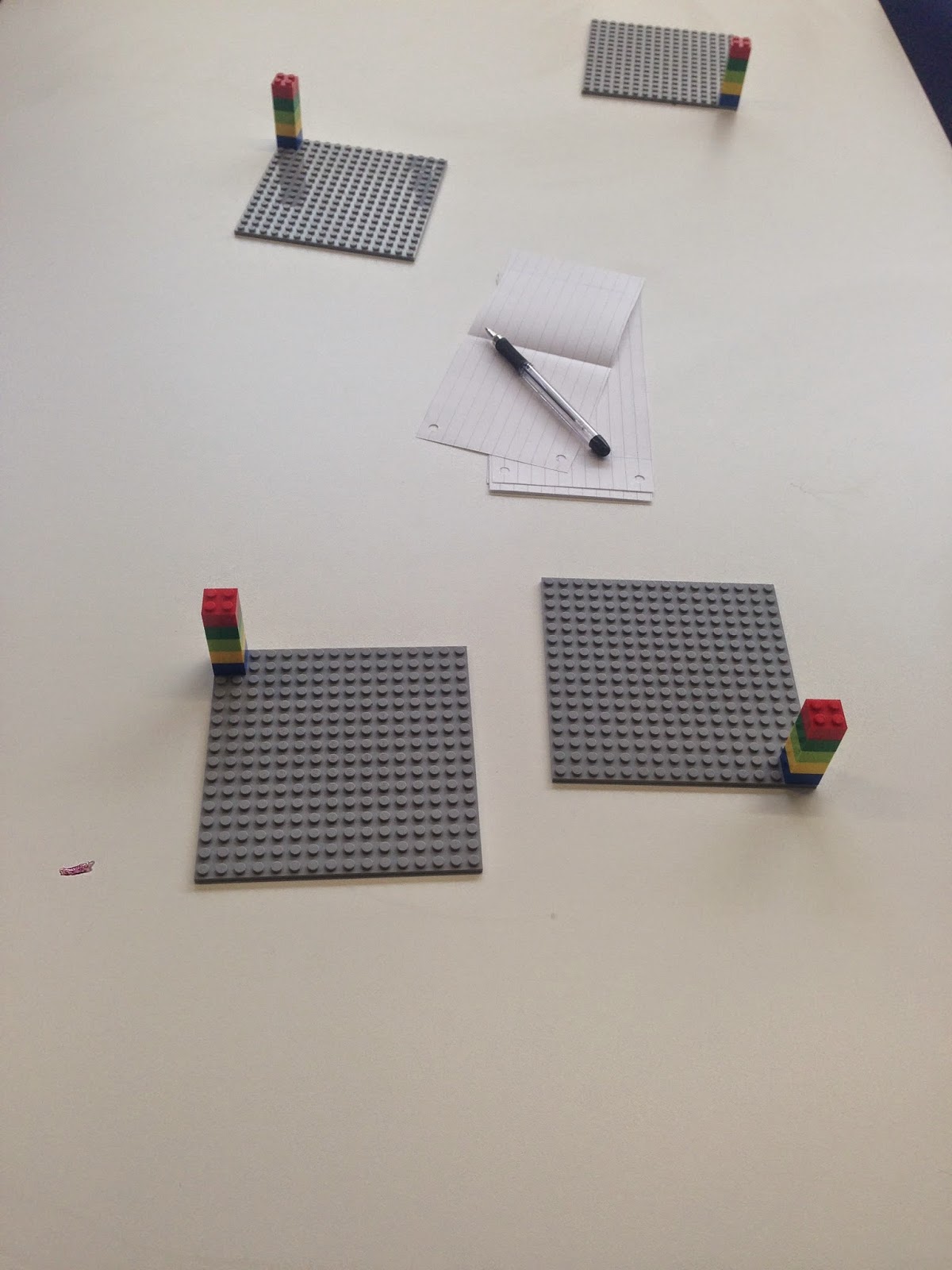
Students were thrilled when they arrived to my Design class. I had set up base plates, with 5 bricks, papers and pens. We briefly talked about coding, communicating with machines and went over the vocabulary we had already covered, including algorithms, coding and commands.
Todays lesson had students writing an algorithm to get robots to stack lego bricks in a certain way - our robots were students! My students worked in small groups and had one student playing the part of the robot. The robots went to the back of my room and spent some time coding while the programmers wrote code for their robots.  I gave the student the first pattern I wanted them to code, then let them fill in my grid worksheet to choose their own. We had already decided on some simple commands, which were a set of six arrows, four for direction, one for picking up and one for putting down bricks!


Later on in the lesson we moved onto loops! Students were given a choice of extension tasks and could write a function to get the robot to return to the first place, to recognise colours or they could try and code complicated patterns, (most worked on getting their robots to stack bricks!).

I used some Conversation Cards to get students to reflect on the lesson and to check they understood the different concepts.

I also created this 'I Can Code' form for students to show off their new vocabulary!


You can get all the resources for this lesson, including the PowerPoint, all worksheets and more here

I am super impressed with my grade 6s at the moment - they are getting through so much work! In one class we discussed the many skills of coding, watched a TEDx video from 10 year old app developer Jonathan Buchanan, all investigated a coding app/website (I gave them one each), coded Flappy Bird as a class and every student created a game using Touch Develop's Hour of Code! Very happy to teach such an enthusiastic bunch!